
Introduction: Why Text Case Formatting Matters More Than You Think
Every writer has been there. You paste a block of text into your document and realize it’s all in CAPS LOCK. Or you’ve drafted a set of headings and none of them follow proper title case. These small formatting issues eat up your time and quietly hurt your content’s professionalism.
That’s exactly why case converter tools for writers have become essential in the modern writing workflow. Whether you’re a blogger, SEO content writer, student, or novelist, getting your text capitalization right is not optional — it’s a mark of quality.
The good news? You don’t need expensive software or complicated editing skills. Tools like the free Case Converter at MegaFreeTools let you convert any text — uppercase, lowercase, title case, or sentence case — in just one click. And while you’re there, you’ll find a complete suite of free writing and formatting tools that make content creation faster and smoother.
In this article, we’ll walk you through everything you need to know about text case converter tools — what they are, why they matter for SEO and readability, and which ones are genuinely worth using.
What Is a Case Converter Tool?
A case converter tool is a free online text formatting utility that lets you instantly change the letter case of any text. Instead of manually retyping or using keyboard shortcuts that don’t always work, you simply paste your text, select the case format you want, and the tool transforms it in seconds.
Here’s a quick snapshot of the most common case types you can convert to:
- UPPERCASE – ALL LETTERS ARE CAPITALIZED
- lowercase – all letters are in small form
- Title Case – Every Major Word Starts With a Capital Letter
- Sentence case – Only the first letter of each sentence is capitalized
- camelCase – Used mostly in coding and programming
- Alternating cAsE – Letters alternate between caps and lowercase
These conversions are used by bloggers, journalists, developers, SEO writers, and students daily. A good text case converter online handles all of these instantly, with no login or download required.
Types of Case Conversions Every Writer Should Know
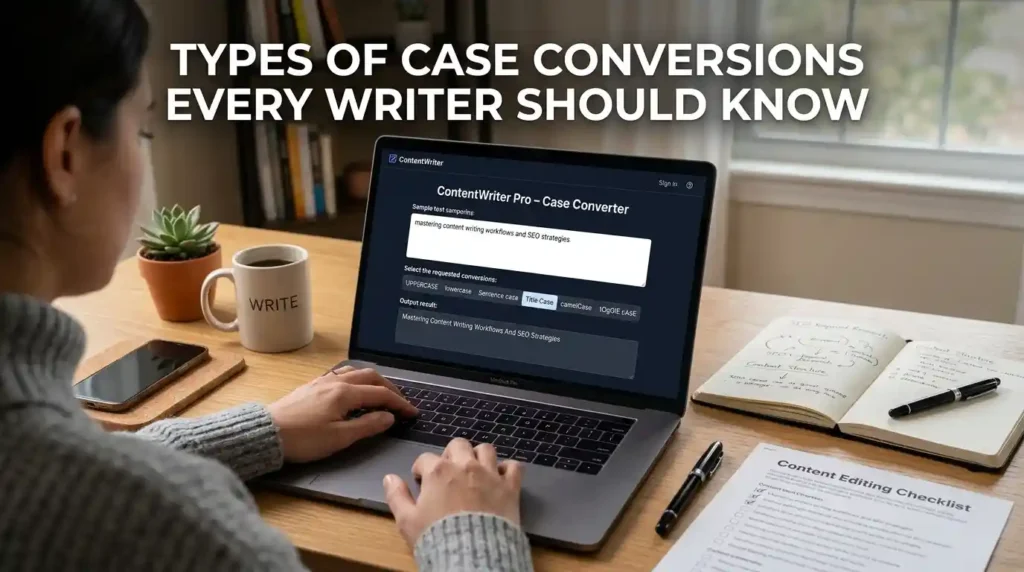
Understanding which case to use — and when — is an underrated writing skill. Here’s a breakdown that helps you format smarter:
Uppercase Converter
When do you need all caps? Think acronyms (NASA, SEO, HTML), strong emphases, or certain headline styles. The uppercase converter makes this instantly possible without retyping a single character.
Lowercase Converter
Accidentally typed with CAPS LOCK on? The convert uppercase to lowercase function fixes it in one click. It’s one of the most used features in any text formatting tool online.
Title Case Converter
Blog post titles, article headings, book chapters, email subjects — all of these typically follow title case formatting rules. A title case converter online automatically capitalizes the right words while skipping articles and prepositions like “a,” “the,” and “of.”
Sentence Case Converter
Ideal for body text, captions, and standard paragraph formatting. The sentence case converter tool capitalizes only the first word of every sentence, giving your text a clean, natural reading flow.
Key Features to Look for in a Good Case Converter Tool
Not all case converters are built the same. Here’s what separates a genuinely useful case converter tool from a basic one:
- Multiple case format options – Should offer at least uppercase, lowercase, title case, and sentence case
- Instant conversion with no delay – Processing should happen in real time as you paste or type
- Copy-to-clipboard button – One-click copy saves time significantly
- No word or character limit – Useful for long-form content, especially articles or reports
- Clean, distraction-free interface – Writers need focus, not clutter
- Works on mobile and desktop – Responsive design matters
- Completely free – No paywalls, no subscriptions, no hidden fees
- No login required – Privacy-friendly and fast to access
The MegaFreeTools Case Converter checks every single one of these boxes, making it one of the most practical free case converter tools for writers available online today.
How to Use a Case Converter Tool Online – Step by Step
Using a text case converter is genuinely one of the simplest tasks in digital writing. Here’s how it works:
Step 1: Open the Case Converter Tool at MegaFreeTools in your browser.
Step 2: Copy the text you want to convert — a sentence, a paragraph, or even an entire article.
Step 3: Paste the text into the input box on the tool.
Step 4: Select your desired case format — uppercase, lowercase, title case, sentence case, etc.
Step 5: The tool instantly reformats your text. Review it quickly.
Step 6: Click the “Copy” button and paste your formatted text wherever you need it.
That’s it. The entire process takes under 30 seconds, even for long documents. No registration, no downloads, no cost.
Benefits of Using a Case Converter for Writers and Bloggers
Why should you make a text capitalization tool part of your regular writing process? Here’s the real value:
Saves significant time. Manually fixing capitalization in a 2,000-word article could take 10–15 minutes. A case converter does it in seconds.
Improves content quality. Inconsistent capitalization is a surprisingly common error in published content. Using a sentence case formatting tool ensures professionalism across every piece.
Boosts SEO performance. Properly formatted headings using title case converter tools help search engines understand your content hierarchy. Google pays attention to heading structure.
Reduces proofreading errors. When your capitalization is already sorted, you can focus your editing energy on grammar, flow, and meaning.
Ideal for repurposed content. If you’re converting content from one format to another — say, reformatting a PDF into a blog post — text case tools help you clean up inconsistencies fast.
Works for non-native English writers. Writers in Pakistan, India, and across Asia often work in English as a second language. Free writing tools for Pakistan students and global users make the writing process significantly less stressful.
Real-Life Use Cases: Who Actually Uses These Tools?
Bloggers and content writers use title case converters to format their headings correctly before publishing on WordPress, Medium, or Ghost.
SEO specialists use sentence case tools to write meta descriptions and alt text that follow platform-specific formatting rules.
Students and academics use lowercase or sentence case converters when formatting citations, references, and academic titles.
Social media managers use uppercase converters for emphasis in promotional posts or all-caps announcements.
Developers use camelCase or other code-specific formats when naming variables and writing documentation.
Editors and proofreaders use case converters to batch-fix client submissions that come in with messy formatting.
If you regularly create content online, you’ve already needed one of these tools — you just may not have had the right one bookmarked. Alongside the case converter, tools like the Word Counter, Online Notepad, and Text to PDF at MegaFreeTools form a complete writing toolkit for everyday use.
What Is the Best Free Case Converter Tool Online?

The best free case converter tool for writers online is the one that works instantly, supports all major case formats, requires no sign-up, and is accessible from any device. MegaFreeTools delivers exactly that with its case converter — fast, accurate, and completely free for everyone.
Other tools in the space include ConvertCase.co and SmallSEOTools, but what sets MegaFreeTools apart is the combination of simplicity, speed, and a broader ecosystem of writing tools on the same platform — so you’re never bouncing between five different websites to finish one piece of content.
SEO and Text Formatting: Why Capitalization Affects Rankings
Here’s something many writers overlook: how you format your headings and text actually influences your SEO performance.
Search engines like Google use heading tags (H1, H2, H3) to understand the structure and relevance of your content. When your headings are properly formatted — using consistent title case or sentence case conventions — it signals clarity and organization to both readers and crawlers.
According to Google’s own content quality guidelines, readability and structure are key signals for helpful content. A text formatting tool that helps you maintain consistency directly supports your on-page SEO efforts. For more advanced SEO content tools and writing resources, websites like Toolify Worlds offer additional reference points worth exploring.
Using the right capitalization in your meta titles and descriptions also affects click-through rates in search results. A well-formatted title in Title Case tends to look more authoritative and professional in SERPs, which can influence whether a user clicks on your link or scrolls past it.
Common Capitalization Mistakes Writers Make
Even experienced writers make these errors regularly:
- Capitalizing every word in body text (that’s only for titles)
- Using all caps for emphasis in formal writing (use bold instead)
- Forgetting to capitalize proper nouns after using a lowercase converter
- Inconsistent heading styles across an article (mixing title case and sentence case randomly)
- Over-capitalizing job titles when they’re not directly before a name
A good case converter tool won’t catch all of these — but it gives you a reliable starting point and saves the bulk of your formatting time.
Why Choose MegaFreeTools for Your Writing Needs?
MegaFreeTools is built around one clear mission: give writers, students, developers, and digital professionals access to powerful tools without any cost or complexity.
Here’s why it stands out:
- 100% free – Every tool on the platform costs nothing to use
- No registration required – Open any tool and start working immediately
- Fast and lightweight – Tools load instantly even on slower connections
- Wide range of utilities – From the Image Resizer and PDF Compressor to the QR Code Generator and Password Generator, everything a modern creator needs is in one place
- Mobile-friendly – Works smoothly on phones and tablets
- Trusted by global users – Including students, freelancers, and professionals across Pakistan, India, and beyond
If you’re looking for a reliable writing partner that handles the technical side of content formatting, explore the full tools library at MegaFreeTools — it covers far more than just case conversion.
How MegaFreeTools Compares to Other Writing Tools
| Feature | MegaFreeTools | Generic Case Converters | Premium Writing Tools |
|---|---|---|---|
| Free to use | ✅ Yes | ✅ Yes | ❌ Often paid |
| Multiple case formats | ✅ Yes | Sometimes | ✅ Yes |
| No login required | ✅ Yes | Sometimes | ❌ Usually required |
| Additional writing tools | ✅ Full suite | ❌ Single tool | ✅ Yes |
| Mobile-friendly | ✅ Yes | Sometimes | ✅ Yes |
| Ad-heavy interface | ❌ No | Often | ❌ No |
The advantage of using a platform like MegaFreeTools over single-function case converter sites is clear: you get one reliable destination for multiple writing tasks, which saves time and keeps your workflow clean.
Frequently Asked Questions About Case Converter Tools
What is a case converter tool? A case converter tool is a free online utility that changes the letter case of any text — converting it to uppercase, lowercase, title case, sentence case, or other formats — instantly and without any software installation.
Why do writers use case converter tools? Writers use case converter tools to save time on manual formatting, maintain consistency across their content, and ensure their headings and text follow proper capitalization conventions for both readability and SEO.
What is the best free case converter online? The best free case converter online is available at MegaFreeTools. It supports all major case formats, works instantly, requires no login, and is completely free for unlimited use.
How do I change text to title case? Paste your text into the MegaFreeTools Case Converter, select the “Title Case” option, and the tool automatically capitalizes the correct words in your text following standard title case rules.
Can I convert text to lowercase online? Yes. Simply paste your text into any online case converter tool, select the “Lowercase” option, and every letter will be converted to its lowercase form instantly.
Are case converter tools free to use? Yes, most quality case converter tools — including the one at MegaFreeTools — are completely free with no hidden charges, subscriptions, or usage limits.
Which case is best for blog headings? Title case is generally recommended for blog post titles and major headings, while sentence case works well for subheadings and body content. Always stay consistent within a single article.
How do I fix CAPS LOCK text quickly? Open the Case Converter at MegaFreeTools, paste your all-caps text, and select “Sentence Case” or “Lowercase” — your text will be corrected instantly.
Conclusion: Start Formatting Smarter Today

Text case formatting is one of those small details that quietly defines the quality of your writing. It affects how professional your content looks, how search engines interpret your headings, and how readers experience your work. Getting it wrong wastes time; getting it right builds credibility.
The best case converter tools for writers are the ones that are fast, accurate, free, and easy to use without any technical knowledge. That’s precisely what you get with the Case Converter at MegaFreeTools.
Whether you’re fixing an accidental CAPS LOCK error, formatting a set of blog headings, or preparing content for publication, this tool handles it in seconds. And with a full suite of complementary utilities — from Word to PDF to Image Compressor to Background Remover — MegaFreeTools is the one-stop destination that modern writers genuinely deserve.
Try the free Case Converter now and take the friction out of text formatting — because great writing deserves clean presentation.
For additional writing resources and digital tool references, you can also explore Baco Consultants for professional content strategy insights.
Keywords Used: best case converter tools for writers, text case converter, uppercase lowercase converter, title case converter online, sentence case converter tool, free case converter for writers, convert text to uppercase, convert text to lowercase, text capitalization tool, writing formatting tools, text formatting tools for writers, writing productivity tools, content editing tools online, best free case converter tools for writers online, how to convert text to uppercase and lowercase instantly, free case converter tool for SEO content writing, case converter, text converter, writing tools, formatting tool

