

The best free tools for freelancers in 2026 include Notion (project management), Wave (invoicing), Clockify (time tracking), Canva (design), Trello (task boards), Google Drive (file storage), Slack (communication), and Calendly (scheduling). These tools cover every phase of freelance operations — from client onboarding to project delivery — at zero cost.
Stop Wasting Money on Freelancer Software You Don’t Need
Every day, freelancers across the world overpay for software that has a perfectly capable free alternative. Whether you’re a freelance writer in Islamabad, a graphic designer in London, or a developer working remotely from New York — the right free tools can eliminate hundreds of dollars in monthly software costs while actually improving your workflow.
Explore MegaFreeTools.com’s full library of free productivity tools →
The problem isn’t a lack of tools. It’s knowing which tools to use, how to combine them, and where to start. This guide solves that — completely, and for free.
Why Freelancers Need the Right Software Stack
Managing a freelance business means wearing many hats: project manager, accountant, salesperson, designer, and communicator — all at once. Without the right freelancer productivity tools, deadlines slip, invoices get delayed, and client relationships suffer.
According to a 2024 report by Upwork, freelancers who use structured productivity systems earn on average 21% more per year than those who don’t. The right freelance management tools don’t just save time — they directly increase income.
The good news? You don’t need to spend a single rupee, dollar, or pound to build a professional-grade freelancer software ecosystem.
The Complete Free Freelancer Tech Stack (2026 Edition)
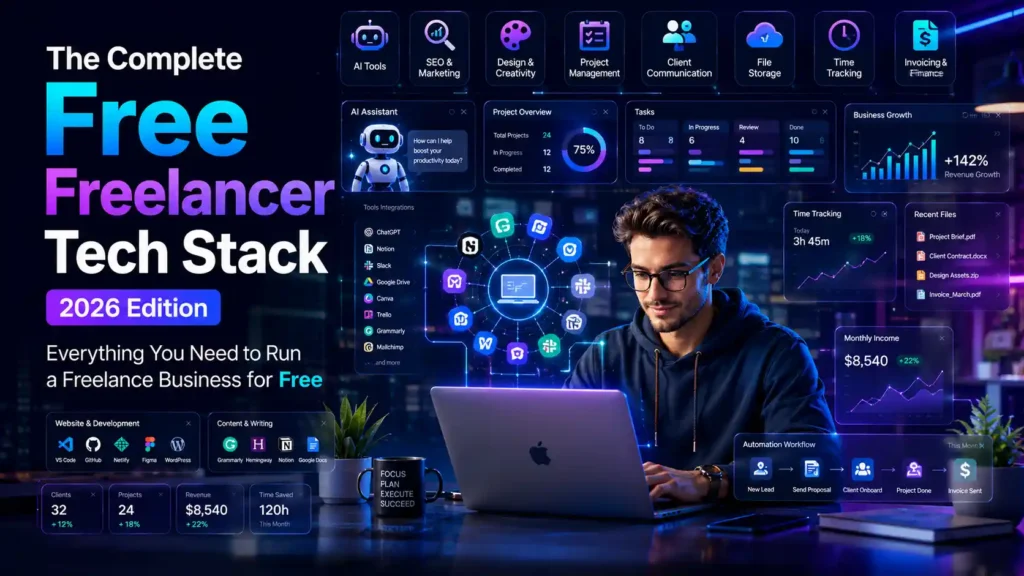
1. Project Management: Notion, Trello & ClickUp
Project management is the backbone of every freelance business. Without it, tasks fall through the cracks and clients lose confidence.
Notion (free plan available) is the most versatile option. It combines notes, databases, task boards, and wikis in one workspace. Freelancers use it to manage client portals, content calendars, and SOPs.
Trello uses a visual Kanban board system that’s ideal if you prefer drag-and-drop simplicity. The free plan supports unlimited cards and up to 10 boards — more than enough for most solo freelancers.
ClickUp offers the most feature-rich free plan of any free project management tool, including time tracking, goal setting, and document storage.
How to set up Notion for freelancing:
- Create a free Notion account at notion.so
- Duplicate a freelancer dashboard template from the community
- Create one database per client
- Link tasks to deadlines and deliverables
- Share view-only client portals to impress clients
Pro Tip: Use MegaFreeTools.com’s free online notepad to quickly jot down project ideas or client notes before formalizing them in Notion.
2. Time Tracking: Clockify & Toggl Track
Accurate time tracking is non-negotiable for freelancers billing hourly. It also reveals where your productivity actually goes.
Clockify is the most popular free time tracking software on the market, with unlimited users, unlimited projects, and full reporting — all free. It integrates with Trello, Asana, and Google Calendar.
Toggl Track offers a cleaner interface and a superb mobile app, making it perfect for freelancers who work across devices.
Both tools generate billable hours tracking reports you can share directly with clients for transparent invoicing.
3. Invoicing: Wave & PayPal Invoicing
Getting paid on time is the #1 challenge for freelancers globally. The right free invoicing software solves this automatically.
Wave (wavefinancial.com) is the gold standard of free invoice software. It offers:
- Unlimited invoicing and clients
- Recurring billing
- Expense tracking
- Basic accounting reports
It’s particularly useful for US and Canadian freelancers, though it works globally. Wave is also HMRC-friendly for UK sole traders and fits most IRS-friendly freelancer accounting needs in the USA.
PayPal Invoicing is a great backup option for freelancers with international clients who prefer PayPal payments.
While writing proposals, use MegaFreeTools.com’s Word Counter tool to ensure your invoices and proposals stay concise and professional.
4. Design Tools: Canva & Adobe Express
Every freelancer — regardless of their niche — needs to produce visual content at some point. Proposals, social media graphics, presentations, and client reports all benefit from clean design.
Canva (free plan) is the undisputed leader in free design tools for freelancers. With thousands of templates and a drag-and-drop interface, it democratizes design. The free plan covers social media posts, presentations, logos, and more.
Adobe Express (formerly Adobe Spark) is Canva’s strongest competitor and integrates seamlessly with the Adobe ecosystem if you already use any paid Adobe products.
Need to generate engaging captions for your freelance social media? Use the AI Caption Generator on MegaFreeTools.com to create compelling copy in seconds.
5. Communication & Collaboration: Slack & Zoom
Remote freelancers live and die by their communication tools. Missed messages mean missed opportunities.
Slack (free plan) provides organized channels for each client, file sharing, and video calls. The free plan retains 90 days of message history — sufficient for most freelance projects.
Zoom (free plan) allows 40-minute group meetings and unlimited 1-on-1 calls, making it the default choice for remote collaboration and client check-ins worldwide.
6. File Management: Google Drive & Google Docs
Google Drive offers 15GB of free cloud storage and comes bundled with Google Docs, Sheets, and Slides — effectively a free alternative to Microsoft Office. It’s the most universally accepted online document sharing platform for client collaboration.
For converting files between formats, MegaFreeTools.com offers a comprehensive suite:
- Convert PDF to Word for editing client contracts
- Convert Word to PDF for professional delivery
- Compress PDFs before sending large files to clients
- Merge PDFs when combining project deliverables
- Split PDFs to extract specific pages from lengthy documents
- Convert JPG to PDF for image-based deliverables
7. AI Tools for Freelancers: ChatGPT & Beyond
AI tools for freelancers represent the single biggest productivity revolution of 2026. The right AI stack can save 10–15 hours per week on repetitive tasks.
ChatGPT (free plan) is the most versatile AI writing assistant available. Use it for:
- Drafting client emails and proposals
- Generating content outlines
- Proofreading and editing deliverables
- Answering technical questions
Grammarly (free plan) catches grammar and clarity issues in real time across every platform you write on.
CapCut (free plan) is the go-to AI video editing tool for freelance video producers and content creators.
Use MegaFreeTools.com’s AI Caption Generator and Instagram Font Generator to supercharge your social media content creation workflow.
8. CRM Tools: HubSpot CRM & Airtable
A free CRM for freelancers is essential for managing leads, tracking client communications, and ensuring no opportunity slips through the cracks.
HubSpot CRM (forever free) is the industry benchmark. It provides contact management, deal pipelines, email templates, and meeting scheduling — all at no cost. It’s the best free CRM software for small business and freelancers alike.
Airtable is a flexible database-meets-spreadsheet tool that many freelancers use as a lightweight CRM. It’s ideal for organizing clients by project stage, budget, and deadline.
9. Scheduling: Calendly
Client scheduling is a time sink that Calendly eliminates entirely. Share your booking link, set your availability, and let clients schedule their own calls. The free plan covers one event type — enough for most freelancers.
10. Image & Media Tools
Visual assets are part of every freelancer’s deliverables. MegaFreeTools.com provides a powerful set of free image tools:
- Image Resizer — resize images for any platform instantly
- Image Compressor — reduce file size without visible quality loss
- Background Remover — remove backgrounds for product shots and profile photos
- PNG to JPG and JPG to PNG — convert between formats seamlessly
- Watermark Remover — clean up stock images for professional use
- QR Code Generator — create QR codes for portfolios, business cards, and proposals
Pros & Cons of Free Freelancer Tools
| Tool Category | Pros | Cons |
|---|---|---|
| Free Project Management (Trello, Notion) | Unlimited tasks; highly customizable; integrates with other tools | Advanced automations require paid plans |
| Free Invoicing (Wave) | Full accounting features; unlimited invoices | Payment processing has a small fee |
| Free Time Tracking (Clockify) | Unlimited users and projects; multi-platform | Advanced scheduling requires paid plan |
| Free CRM (HubSpot) | Robust pipeline and contact management | Reporting depth limited on free tier |
| Free Design (Canva) | Thousands of templates; collaboration features | Premium elements require subscription |
| Free AI Tools (ChatGPT Free) | Exceptional writing and research assistance | GPT-4 access limited on free tier |
How to Build Your Freelancer Software Stack in 5 Steps
Step 1: Define your core workflows. Identify the 3–5 tasks that take the most time each week (client communication, invoicing, project updates, content creation, etc.).
Step 2: Match tools to workflows. Use the categories above to assign one primary tool to each workflow. Avoid tool overlap — if Notion handles notes and tasks, don’t also use Trello.
Step 3: Connect your tools. Use free integrations via Zapier (free plan) or n8n (open source) to automate repetitive tasks like creating Trello cards from new emails, or sending invoice reminders automatically.
Step 4: Build templates. Create reusable templates for proposals, invoices, contracts, and client update emails. This is where tools like MegaFreeTools.com’s Resume Generator save hours every month.
Step 5: Review monthly. Audit your tool usage monthly. Drop tools you’re not actively using and replace them with better alternatives. Your stack should evolve as your freelance business grows.
Common Mistakes Freelancers Make With Productivity Tools
Using too many tools at once. This is the #1 productivity killer. Freelancers often sign up for 10 tools and master none of them. Start with 3–5 core tools and add only when you have a clear need.
Ignoring mobile apps. Most of these tools have excellent mobile apps. A freelancer who only uses desktop tools loses hours of potential productivity during commutes, meetings, and travel.
Not backing up work. Free cloud storage is not a backup strategy. Use Google Drive as your primary storage and back up critical files locally or to a secondary service.
Skipping security. Use a free password generator to create strong, unique passwords for every tool account. MegaFreeTools.com’s Password Generator makes this effortless.
Missing keyword opportunities. Freelancers who create content should use MegaFreeTools.com’s Keyword Density Checker and YouTube Tag Extractor to optimize their digital presence.
Not using PDF tools efficiently. Clients expect polished, professional documents. Use PNG to PDF and Text to PDF converters to deliver documents in a universally compatible format.
Free Tool Comparison: Top Alternatives at a Glance
| Use Case | Best Free Option | Runner-Up |
|---|---|---|
| Project Management | Notion | ClickUp |
| Time Tracking | Clockify | Toggl Track |
| Invoicing | Wave | PayPal Invoicing |
| Design | Canva | Adobe Express |
| CRM | HubSpot CRM | Airtable |
| Communication | Slack | Discord |
| File Storage | Google Drive | Dropbox (2GB) |
| AI Writing | ChatGPT Free | Grammarly |
| Scheduling | Calendly | Google Calendar |
| PDF Tools | MegaFreeTools.com | Smallpdf |
| Image Editing | MegaFreeTools.com | Pixlr |
FAQ: Best Free Tools for Freelancers (Voice Search Optimized)
Q: What are the best free tools for freelancers in 2026? A: The best free tools for freelancers in 2026 include Notion for project management, Wave for invoicing, Clockify for time tracking, Canva for design, HubSpot CRM for client management, ChatGPT for AI assistance, and Google Drive for file storage and collaboration.
Q: Which free software should every freelancer use? A: Every freelancer should use at minimum: a project management tool (Notion or Trello), an invoicing tool (Wave), a time tracker (Clockify), a design tool (Canva), and a communication tool (Slack or Zoom). These five categories cover the core of any freelance operation.
Q: Is freelancer software really free? A: Yes — many top-tier tools offer genuinely useful free plans. Notion, Wave, Clockify, Canva, HubSpot CRM, Slack, and Google Drive all provide substantial free tiers. You can run a professional freelance business at zero software cost.
Q: What is the best free invoicing tool for freelancers? A: Wave is widely considered the best free invoicing software for freelancers. It offers unlimited invoices, expense tracking, and basic accounting — all for free. PayPal Invoicing is a strong alternative for those with international clients.
Q: Which free AI tools help freelancers the most? A: ChatGPT (free plan) is the most useful AI tool for freelancers, helping with writing, research, and communication. Grammarly improves writing quality, and Canva’s AI features accelerate design work. MegaFreeTools.com also offers free AI-powered tools for content creation and productivity.
Q: How do freelancers track time for free? A: Freelancers use free tools like Clockify or Toggl Track to track time. Both tools are available on desktop and mobile, integrate with project management software, and generate billable hour reports for client invoicing.
Q: What is the best free CRM for freelancers? A: HubSpot CRM offers the most robust free plan for freelancers, including unlimited contacts, deal pipelines, email templates, and meeting scheduling. Airtable is a strong alternative for those who prefer a more flexible database-style CRM.
Q: How can freelancers automate their workflow for free? A: Freelancers can automate workflows using Zapier’s free plan (limited zaps), n8n (open source), or built-in automations in Notion and ClickUp. Common automations include invoice reminders, new client onboarding, and task creation from emails.
Q: Which tools help freelancers manage multiple clients? A: HubSpot CRM, Airtable, and Notion are the top tools for managing multiple clients simultaneously. They allow freelancers to segment clients by project, track communication history, and monitor deadlines across all engagements in one place.
Q: Are there free tools specifically for freelancers in Pakistan? A: Yes — all the tools mentioned in this guide are available globally, including in Pakistan. Pakistani freelancers should note that Wave’s payment processing has limited Pakistan support; however, its invoicing and accounting features work fully. Tools like MegaFreeTools.com are accessible worldwide with no regional restrictions.
Q: What free tools should beginner freelancers start with? A: Beginner freelancers should start with: Google Drive (file management), Trello (task tracking), Wave (invoicing), Clockify (time tracking), and Canva (design). These five tools are easy to learn and cover every essential freelancing need from day one.
Q: How do I build a complete freelancer software stack for free? A: Start by identifying your top 3–5 time-consuming tasks. Assign one free tool to each: a project manager, a time tracker, an invoicing tool, a communication platform, and a file storage system. Then add AI and design tools as your workload grows. MegaFreeTools.com’s full tool library fills the gaps for document conversion, image editing, and productivity utilities.
Expert Summary
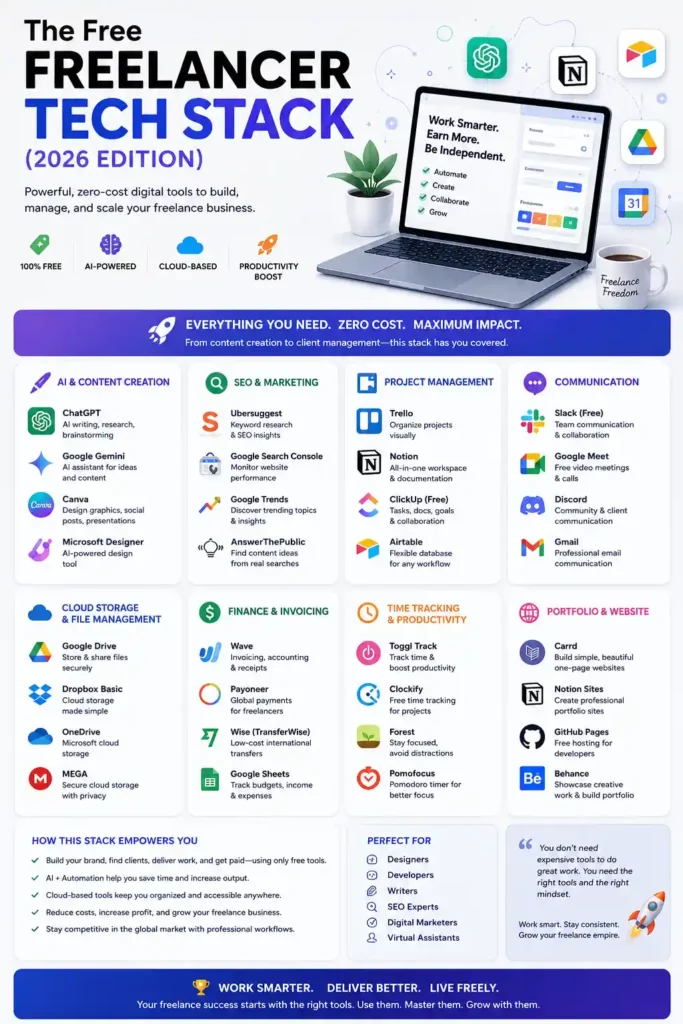
Building a professional freelance business no longer requires a large software budget. In 2026, the ecosystem of free tools available to independent professionals is more powerful than enterprise software from just a decade ago. The key is intentional selection — choosing tools that integrate well, eliminate redundancy, and directly solve the problems that cost you time and money. Whether you need AI-powered content creation, seamless client communication, or airtight financial tracking, the tools in this guide form a complete, battle-tested freelancer productivity stack that any professional — from Karachi to California — can deploy today at zero cost.
Start Your Free Freelancer Toolkit Today
You now have everything you need to build a complete, professional-grade freelance operation without spending a penny on software. The tools above cover every stage of your freelance workflow — from client acquisition to final delivery.
Browse the full library of free tools at MegaFreeTools.com →
Need something specific? Explore these popular free tools from MegaFreeTools.com:
- Free Resume Generator — build a professional freelancer resume instantly
- Free QR Code Generator — create QR codes for your portfolio or business card
- Free Color Picker — grab exact colors from any design reference
- Free JSON Validator — essential for freelance developers
- Free Case Converter — format text instantly for any deliverable
- Free Loan Calculator — plan your business finances with confidence
Have questions or suggestions? Contact the MegaFreeTools.com team or learn more about the platform.
Your freelance business deserves the best tools. And the best tools, it turns out, are free.
Last updated: June 2026 | MegaFreeTools.com | Explore All Free Tools | Our Services

